

Overview
Introduction
The Paytransfer payment platform is designed for processing purchase, payout, and refund, by using different payment methods and providing other services related to payment processing.
Payout, refund, and Host-to-Host purchase are processed with the use of Gate—the programming interface designed for accepting requests sent from your system to the Paytransfer payment platform. The Gate meets the requirements of the Representational State Transfer (REST) architectural style and is backward compatible—in other words, all components developed for any older version of Gate work correctly with the current version without changing the program code on your side.
Interaction concepts
The payment platform main interaction parties are your system and the provider web service. The Paytransfer payment platform and your system interact by exchanging request and reply messages in the HTTP format: your system sends requests and the payment platform responds to these requests by sending either responses or callbacks.
When the payment platform receives the request, it is sent for processing: at this stage, the request is checked for correctness and all necessary parameters. After that, the payment platform completes all actions necessary to receive the information about the request processing result and transmits this information to your system in the form of a callback.
All interactions with the payment platform are carried out with the use of HTTP of version 1.1 or later and TLS of version 1.2 or later, and the data sent in the requests and callbacks should be handled with the use of the UTF-8 encoding. The payment platform supports the latest versions of such browsers as Chrome, Safari, Opera, Firefox, Microsoft Edge, Internet Explorer, Yandex Browser, QQ, MIUI, Samsung Internet, 360, and others. For more information about using the payment platform in different technical environments, contact the Paytransfer technical support specialists.
- Do not cache name resolution information for the DNS names and addresses of the payment platform.
- Do not apply Access Control List (ACL) to outbound connections to the payment platform.
- If possible, do not use SSL/TLS Fingerprinting for outbound connections to the payment platform.
- Update your root certificates at least once every six months.
Getting started
To integrate with the Paytransfer payment platform, you need to complete the following steps:
-
Handle the organizational matters concerning the integration with Paytransfer:
- If the company has never obtained a project identifier or a secret key from Paytransfer, submit an application for connecting to the payment platform.
- Contact the Paytransfer technical support specialists to coordinate the procedures and deadlines of integration and going live.
- Complete preliminary technical tasks.
To be able to process purchase, do the following:
- Install and link all necessary libraries.
- On the client side of your system, implement collecting parameters to pass in purchase requests; also implement generation and sending requests for opening the checkout page.
- On the server side of your system, implement signature generation and callback response processing.
To be able to process payout, do the following:
- Enable the processes of collecting the required parameters as well as building and sending the requests for initiating payout.
- On the server side of your system, implement signature generation and callback response processing.
-
Together with the Paytransfer technical support specialists test and launch the technical solution.
To start the integration with the Paytransfer payment platform, contact the Paytransfer key account manager; with technical issues, contact our technical support specialists (support@paytransfer.kz).
Host-to-Host Purchase
Overview
Purchase is a payment type which uses one request to make a one-time transfer of funds from customer to your system.
The Host-to-Host purchase is performed using the Gate interface and all interactions with customers are complete in your system.
This section covers information about the Host-to-Host purchase.
Workflow
When performing a purchase by using Gate, do the following:
- Submit the purchase request.
- Receive a callback with the payment result from the payment platform.
The following diagram illustrates the purchase workflow without additional procedures.
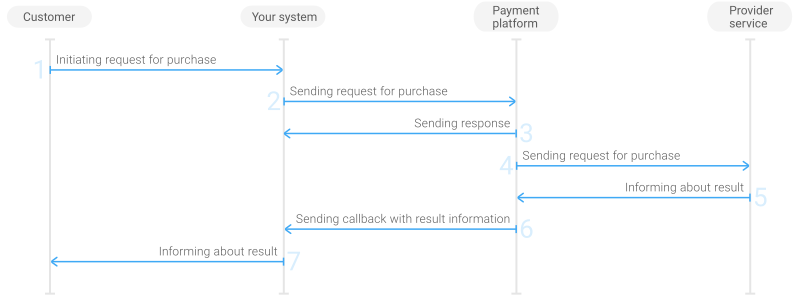
- Customer initiates a purchase in your system.
- Your system sends the request for processing the purchase to the specified Paytransfer URL.
- The payment platform sends to your system the response with request receipt confirmation and verification result.
- The payment platform processes the request and forwards it to the provider service.
- The provider service informs the payment platform about the purchase result.
- The payment platform sends the callback with the payment result to your system.
- Your system sends the payment result to the customer.
Request
Overview
To perform a purchase, you need to build and submit a request to the payment platform with the use of the POST method. The request is an HTTP message and should contain the following elements in the given order:
- The start-line with the request method (
POST), the endpoint, and the protocol with its version (HTTP/1.1) specified. Available endpoints:- /v2/payment/card/sale—for payment cards
- /v2/payment/mobile/sale—for mobile commerce
- The header with the
Hostfield that contains the domain name for sending the requests to the platform. - An empty line which serves as a separator between the message header and the body.
- The message body that contains the JSON string in the UTF-8 encoding with the request data including the signature.
Besides the mandatory Host field, the header may include any other fields supported by HTTP version 1.1.
When creating a JSON string, use the following objects and parameters:
| Object | Parameter | Description |
|---|---|---|
|
general |
project_id |
Project ID you obtained from Paytransfer when integrating. Example: |
|
payment_id |
Payment ID unique within your project. Example: |
|
|
signature |
Signature created after you've specified all the request parameters. For more information about signature generation, see Signature generation and verification. | |
|
customer |
id |
Unique ID of the customer within your project. Example: |
|
ip_address |
IP address of the customer's device. Example: |
|
|
first_name |
Customer's first name. Example: |
|
|
last_name |
Customer's last name. Example: |
|
|
email |
Customer's email. Example: |
|
|
payment |
amount |
Payout amount in minor currency units without any decimal point or comma except for the cases when the currency doesn't have any minor currency units. If the currency doesn't have any minor units (i.e. the number of digits for minor currency units is zero), set this parameter to the amount in the major currency units. To check whether the currency has any minor units, see Currency codes. Example: 100.00 USD must be sent as |
|
currency |
Code of the payout currency in the ISO-4217 alpha-3 format. Example: |
Figure 2. Example of the data from the request for a purchase for 300000,00 KZT
{
  "general": {
    "project_id": 2990,
    "payment_id": "X03935",
    "signature": "YWb6Z20ByxpQ30hfTI"
  },
  "customer": {
    "id": "customer_173",
    "ip_address": "198.51.100.47",
    "first_name": "John",
    "last_name": "Doe",
    "email": "johndoe@example.com"
    },
  "card": {
    "pan": "1122334455667788",
    "year": 2030,
    "month": 10,
    "card_holder": "JOHN DOE"
  },
  "payment": {
    "amount": 30000000,
    "currency": "KZT"
  }
}
Depending on payment method, you may also need to add some of the parameters from the following table:
| Payment method | Additional parameters list |
|---|---|
| Payment cards |
|
| Mobile commerce |
|
It is also recommended to specify the following additional parameters in the request:
| Object | Parameter | Description |
|---|---|---|
|
return_url |
success |
The URL for redirecting the customer after the payment is completed. Example: |
|
decline |
The URL for redirecting the customer after the payment is declined. Example: |
|
|
return |
The URL for redirecting the customer when they prematurely terminate the payment. Example: |
|
|
customer |
middle_name |
Customer's middle name. Example: |
Payment statuses
During the payment processing, the payment may have different statuses, that are described in the following table:
error |
Payment processing is not initiated, error occurred when processing the request received by the payment platform. Final status. Payment processing can be reinitiated |
processing |
The payment is being processed. Intermediate status |
awaiting redirect result |
Payment processing is suspended until the callback with a payment result is submitted from the payment system to the payment platform. Depending on the payment result, the payment status is set to During the payment processing, only one of the following statuses can be used: Intermediate status |
awaiting clarification |
Payment processing is suspended. The payment platform waits for you to submit a request containing additional information. If the payment platform does not receive this request from you within 30 minutes, the status is set to Intermediate status. |
awaiting customer action |
Payment processing is suspended until the customer performs the required actions on the side of the payment system that submits the results of these actions to the payment platform (this also depends on a particular payment method that is used for making the payment). Depending on the result that the payment system has submitted to the payment platform, the status is set to success or decline.During the payment processing, only one of the following statuses can be used: Intermediate status |
success |
The payment has been completed. Final status |
decline |
The payment has been declined. Final status |
Additional capabilities
Submission of additional payment information
Overview
Normally, when performing a payment, mandatory parameters that are required to initiate the payment provide enough information. But in some cases, the payment system or the payment platform may ask for some additional parameters. The additional payment information submission procedure implemented on the payment platform allows you to handle these cases, including notifications that you need to submit the additional information.
If you provide all the mandatory and optional parameters in each payment initiation request, you will not be required to submit additional information. Otherwise, you should implement the scenario in which during the payment processing, the payment platform requests additional information and you submit the information.
Workflow
There are two ways the payment platform requests any additional information: callbacks and responses. Normally, the payment platform requests additional data in callbacks; in which case you are not required to submit any additional requests. Alternatively, you can submit a request for payment status to find out whether you should submit any additional information.
Then, your system needs to build and submit the request that contains the additional information. If the payment platform does not receive the additional information in the waiting time, the payment is automatically declined.
The parameter set inside the request body may vary—you can specify all the parameters, part of the parameters, or no parameters at all, but you always must specify the additional_data object inside the request. If the request the payment system receives does not contain this object, the payment system considers the request incorrect and sends an error response.
As soon as the payment platform obtains all the required information, the payment platform continues to process the payment.
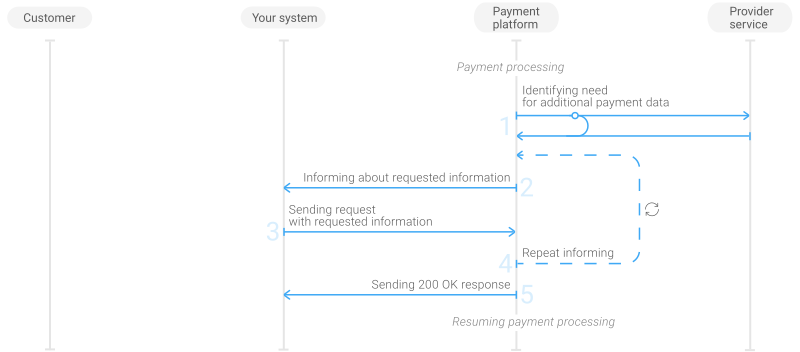
To submit the additional information, your system should:
- Accept the callback or the response with the
clarification_fieldsobject that lists the required parameters. - Build and submit the POST request that contains all the required objects and parameters including the
additional_dataobject and signature to the /v2/payment/clarification endpoint. - Accept and process the
200 OKresponse.
The payment platform responds with the 200 OK code after receiving all the required parameters with correct values. If not, the whole process restarts at the step 1.
Оповещение (callback)
Figure 3. Example of the data from the callback asking for the customer's address and zip code
POST /notify/success HTTP/1.1
Content-Length: 1237
User-Agent: GuzzleHttp/6.3.3 curl/7.47.0 PHP/7.0.32-0ubuntu0.16.04.1
Content-Type: application/json
Host: example.com

{
    "sum_request": {
        "amount": 45000,
        "currency": "KZT"
    },
    "request_id": "80bdc0831c3f8e1",
    "payment": {
        "id": "payment_568485",
        "method": "card",
        "date": "2019-07-29T11:19:33+0000",
        "result_code": "9999",
        "result_message": "Awaiting processing",
        "is_new_attempts_available": false,
        "attempts_timeout": 0,
        "provider_id": 3
    },
    "sum_real": {
        "amount": 45000,
        "currency": "KZT"
    },
    "status": "awaiting clarification",   // Payment status
    "customer": {
        "id": "423432432432534222"
    },
    "clarification_fields": {            // Required information
        "avs_data": [
            "avs_post_code",
            "avs_street_address"
        ]
    },
    "project_id": 11,
    "description": "",
    "operations": [
        {
            "id": 7282148104130,
            "type": "sale",
            "status": "awaiting clarification",
            "date": "2019-07-29T11:19:33+0000",
            "processing_time": null,
            "sum": {
                "amount": 45000,
                "currency": "KZT"
            },
            "code": "9999",
            "message": "Awaiting processing"
        }
    ],
    "signature": "99q4lpCEuNpxp3ugvxF1qPbinWUIwNSLaxcVbF0A=="
}
The callbacks asking for the additional payment information use the standard structure described in Callbacks, but also contain the clarification_fields object that lists the required parameters.
On the right, you can see the example of the data from the callback asking for the customer's address and zip code.
Response
Figure 4. Example of the data from the response asking to specify the customer's email, first and last name, billing address, and the day of birth
HTTP/1.1 200 OK

Server: api.com
Date: Wed, 29 July 2019 09:27:45 GMT
Content-Type: application/json; charset=UTF-8
Content-Length: 875
Connection: keep-alive
Keep-Alive: timeout=60
Cache-Control: no-cache
Access-Control-Allow-Methods: GET, POST, OPTIONS
Access-Control-Allow-Origin: *
X-Powered-By: PHP/7.0.32
Access-Control-Allow-Headers: DNT,X-CustomHeader,Keep-Alive,User-Agent,
X-Requested-With,If-Modified-Since,Cache-Control,Content-Type

{
    "sum_request": {
        "amount": 500,
        "currency": "KZT"
    },
    "request_id": "563c42d4846d105e77",
    "payment": {
        "method": "card",
        "date": "2019-07-29T09:27:45+0000",
        "result_code": "9999",
        "result_message": "Awaiting processing",
        "status": "awaiting clarification",      // Payment status
        "is_new_attempts_available": false,
        "attempts_timeout": 0,
        "id": "E2E_01_0868",
        "cascading_with_redirect": false,
        "provider_id": 1145
    },
    "sum_real": {
        "amount": 500,
        "currency": "KZT"
    },
    "customer": {
        "id": "7826"
    },
    "clarification_fields": {
        "customer": [
            "email",              // Requested information
            "first_name",
            "last_name",
            "billing.address",
            "billing.city",
            "billing.country",
            "billing.postal",
            "day_of_birth"
        ]
    },
    "project_id": 245,
    "description": "",
    "operations": [
        {
            "id": 1315207090506,
            "type": "sale",
            "status": "awaiting clarification",
            "date": "2019-07-29T09:27:45+0000",
            "processing_time": null,
            "request_id": "563c42d4846d105e77",
            "sum": {
                "amount": 500,
                "currency": "KZT"
            },
            "code": "9999",
            "message": "Awaiting processing"
        }
    ],
    "signature": "MYiga7aoW0UBFBfeTdIiF0QFOokEfyuSA=="
}
The responses that the payment platform sends to request additional payment information use the same format that the callbacks use.
On the right, you can see the example of the data from the response asking to specify the customer's email, first and last name, billing address, and the day of birth.
Request structure
Figure 5. Example of the data from the request specifying customer's address and zip code as the additional information
{
  "general": {
    "project_id": 11,
    "payment_id": "EPr-bf14",
    "signature": "v7KNMpfogAthg1ZZ5D/aZAeb0VMdeR+CqghwSm...=="
  },
  "additional_data": {
    "avs_data":{
        "avs_post_code": "99546",
        "avs_street_address": "01 Main Street, CA"
    }
  }
}
Your system needs to submit the additional payment information in a request to the /v2/payment/clarification endpoint by using POST method. The request must contain the following parameters:
| Object | Parameter | Description |
|---|---|---|
|
general |
project_id |
Project ID you obtained from Paytransfer when integrating. Example: |
|
payment_id |
Payment ID unique within your project. Example: |
|
|
signature |
Signature created after you've specified all the request parameters. For more information about signature generation, see Signature generation and verification. | |
|
additional_data |
Object that contains the additional payment information that the payment platform requested. Example: |
On the right, you can see the example of the data from the request specifying customer's address and zip code as the additional information.
Checking the payment status
Overview
While working with the Paytransfer payment platform, you can monitor the payment processing information on Dashboard, in callbacks (to learn more, see Callbacks) or responses to payment status requests. These requests can be sent whenever needed—for example, you may need to check the status of the when its processing can take more than a day—but not earlier than 10 seconds after the initial payment request was sent. However, it is important to keep in mind that payment information is available only when the request in question has been received and the payment has been registered.
A payment status request is processed within one HTTP session and uses only the resources of the payment platform. The response to the correct request contains an HTTP response status code (200) and the required data without detailed request processing information. To learn more about HTTP response status codes, see Response structure.
Request format
Figure 6. Example of the data from the payment status request
{
    "general":{
       "project_id":50,
       "payment_id":"ORDER_ID_302bis",
       "signature":"qflDO7yiPKCFTyqCAaT+2/f9Gi20aV5woHKyf6J/CGJyuSjq1GH7BYgmil8APKojXw=="
    }
}
To check current payment information, your system is required to send a request to the /v2/payment/status endpoint and its body must contain the general object with the following identification information:
| Object | Parameter | Description |
|---|---|---|
|
general |
project_id |
Project ID you obtained from Paytransfer when integrating. Example: |
|
payment_id |
Payment ID unique within your project. Example: |
|
|
signature |
Signature created after you've specified all the request parameters. For more information about signature generation, see Signature generation and verification. |
Response examples
Figure 7. Response with the information about a completed payment
HTTP/1.1 200 OK                                    //response status line
...                                                         //header fields
{
  "project_id":50,
  "payment":{
    "id":"ORDER_ID_302bis",
    "type":"purchase",                                      //payment type
    "status":"success",                                     //payment status
    "date":"2019-12-12T15:46:51+0000",
    "method":"card",                                        //payment method code
    "sum_real":{
      "amount":3300,
      "currency":"KZT"
    },
    "description":"Booking"
  },
  "customer":{
    "id":"6361696170"
  },
  "operations":[
    {
      "id":9435219675496,
      "type":"sale",                                         //operation type
      "status":"success",                                    //operation status
      "date":"2019-12-11T15:46:37+0000",
      "created_date":"2019-12-11T15:46:35+0000",
      "request_id":"bcRFZRJkmfcf-178c3d843c99-00009436",
      "sum":{
        "amount":3300,
        "currency":"KZT"
      },
      "code":"0",              //code specifying the status of the sale operation
      "message":"Success",                           //phrase explaining the code
      "eci":"07",
      "provider":{
        "id":1309,
        "payment_id":"2015611",
        "auth_code":"7213535217",
        "date":"2019-12-11T15:46:36+0000"
     }
    }
  ],
  "signature":"yb9JpzzbyEbkxitA9c3+c+0nX7PQwO8TPoYLGcPnZprQNnHgPlanEYqj1SAg=="
}
On the right, you can see the response containing information about a completed purchase. It includes:
- response status code indicating that the payment status request has been successfully processed (
200); - status of the payment in question (
success); - code of the payment method used (
card); - information about
saleoperation contained in theoperationsarray.
Figure 8. Response with the information about a payment in progress
HTTP/1.1 200 OK                                    //response status line
...                                                         //header fields
{
  "project_id":72,
  "payment":{
    "id":"ORDER_ID_tetan_M_2007_2012",
    "type":"purchase",                                      //payment type
    "status":"awaiting redirect result",                    //payment status
    "date":"2019-12-11T15:59:10+0000",
    "method":"card",                             //payment method code
    "sum":{
      "amount":25000,
      "currency":"KZT"
    },
    "description":"Book premium"
  },
  "customer":{
    "id":"Scott"
  },
  "operations":[
    {
      "id":65747461,
      "type":"sale",                                          //operation type
      "status":"awaiting redirect result",                    //operation status
      "date":"2019-12-11T15:59:10+0000",
      "created_date":"2019-12-11T15:59:06+0000",
      "request_id":"97c7dd03080b4293603f28e64-0c415bc3e876c911f2d87-00006979",
      "sum_initial":{
        "amount":25000,
        "currency":"KZT"
      },
      "sum_converted":{
        "amount":25000,
        "currency":"KZT"
      },
      "code":"9999",            //code specifying the status of the sale operation
      "message":"Awaiting processing",                //phrase explaining the code
      "provider":{
        "id":2012,
        "payment_id":"",
        "auth_code":""
      }
    }
  ],
  "signature":"i12QRhdMbrh6iFF2zKQ7X78u+M7KdwhRLpc2gHiF+lL74Wfp7Ylr85NA=="
}
The following response contains information about a purchase in progress which includes:
- response status code indicating that the payment status request has been successfully processed (
200); - status of the payment in question (
awaiting redirect result); - code of the payment method used (
card); - information about the
saleoperation contained in theoperationsarray
Figure 9. Response with the information about the incorrect request
HTTP/1.1 400 Bad Request                    //response status line
...                                                  //header fields
{
   "status":"error",                                 //request processing status
   "code":"2004",                                    //code specifying the status
   "message":"Required field not provided"           //phrase explaining the code
}
The following is the response to the incorrect request. If the request contains an error, the response includes:
- response status code indicating the reason for the error that occurred (
400 Bad Request); - request processing status (
error); - detailed description of the error that occurred: error code (
2004) and the explanatory phrase (Required field not provided).
Purchase refund
General information
In the context of the Paytransfer payment platform, refund is a repayment of the money customer previously paid in a purchase operation.
To make a refund using Gate, you need to submit the corresponding request to the /v2/payment/{payment_method}/refund endpoint. To perform a refund, the platform creates one of the following operations:
reversal—the refund is initiated for the initial purchase amount and before the current business day closingrefund—the refund is initiated for a fraction of the initial purchase amount on the same business day or the refund is initiated after the purchase business day closing for either fraction or total initial amount.
Once a refund is complete, the payment platform sends you a callback with refund completion result and the information about the current purchase status.
Special aspects
The refund performing period depends on the issuing bank or payment provider which performs the operation, and may take a long time.
Any refund changes the payment amount. The callback includes information about the actual payment amount still available for further refunds. The actual payment amount is calculated as the initial purchase amount minus the amount refunded to customer. Suppose that the initial purchase amount is 1500.00
KZT. Then, if you make a 1000.00
KZT refund, the actual payment amount will be 500.00
KZT. If you make another refund for 500.00
KZT, the actual payment amount will be zero.
Depending on payment method, some refund aspects can differ, for instance additional commission may be charged for late refund. For more information about special refund aspects for specific payment methods, contact your account manager at Paytransfer.
Limitations
When performing a refund, you need to observe the following limitations:
- The initial purchase must include at least one money transfer and the purchase status must be one of the following:
success,partially paid, orpartially refunded.If the initial purchase did not result in any money transfer or if the purchase status is not one of the listed above statuses, the refund request is declined and the payment platform sends to your system a callback with the
3281error code. - Refund currency must me the same as the initial purchase currency.
If the currency in your refund request differs from the initial purchase currency, the refund is declined and the payment platform sends to your system a callback with the
3284error code. (For more information about error codes, see Operation statuses and response codes.) - The time between consecutive attempts to send refund request must not be too small.
If you send a repeated refund request within two minutes after the previous attempt, the refund will be declined and the payment platform will send to your system a callback with the
3285error code. - Your account balance must be adequate to perform the refund.
To check your account balance, you can use Dashboard. Alternatively, you can contact your account manager at Paytransfer.
- Specific region requirement for refunds and requirements imposed by payment service providers and payment processors must be observed. For more information about special refund features of specific payment methods, contact your account manager at Paytransfer.
Additionally, the following limitations apply to partial refund:
- Partial refund amount cannot exceed the initial purchase amount, otherwise the refund request is declined and the payment platform sends to your system a callback with the
3283error code. - New partial refund can be initiated only if any previous partial refund in complete, otherwise the refund request is declined and the payment platform sends to your system a callback with the
3285error code.
Request format
Figure 10. Example of refund request data
{
  "general": {
    "project_id": 239,
    "payment_id": "payment2",
    "signature": "of8k9xeKJ7KLTZYO56lCv+f1M0Sf/7eg=="
  },
  "payment": {
    "description": "refund",
// For partial refund:
    "amount": 1000,
    "currency": "KZT"
  }
}
To issue a refund, send a request to the payment platform with the use of the POST method. The request can be sent to one of the following endpoints:
- /v2/payment/card/refund—for payment cards
- /v2/payment/mobile/refund—for mobile commerce
The full refund request body must contain the following objects and parameters:
| Object | Parameter | Description |
|---|---|---|
|
general |
project_id |
Project ID you obtained from Paytransfer when integrating. Example: |
|
payment_id |
Payment ID unique within your project. Example: |
|
|
signature |
Signature created after you've specified all the request parameters. For more information about signature generation, see Signature generation and verification. Example: |
|
|
payment |
description |
Description of the refund reason. This description is relevant only for refund operations and doesn't change the description of the initial purchase if such description was included in the initial purchase request. Example: |
To make a partial refund, you need to add the following parameters in the payment object:
| Object | Parameter | Description |
|---|---|---|
|
payment |
currency |
Code of the payment currency in the ISO-4217 alpha-3 format. Example: |
|
amount |
Refund amount, must be not larger than the actual purchase balance, specified in minor currency units without any decimal point or comma except for the cases when the currency doesn't have any minor currency units. If the currency doesn't have any minor units (i.e. the number of digits for minor currency units is zero), set this parameter to the amount in the major currency units. To check whether the currency has any minor units, see Currency codes. Example: |
Payment statuses
After refund, purchase status can be one of the following:
success |
Purchase is complete, refund is not performed Final status |
reversed |
Refund is performed in full before the current business day completion. Final status |
refunded |
Refund is performed in full after the current business day completion. Final status |
partially refunded |
Refund is performed for a fraction of the initial purchase amount.. Final status |
Payout
Overview
Payout is a payment type which uses one request to make a one-time transfer of funds from your system to customer.
Basically, the payment platform supports making a one-time single payout via Gate, but it is possible to make mass payout via Dashboard. In the latter case, you can have the required payments generated automatically.
Workflow
To perform a payout, do the following:
- Build and submit the payout request to the payment platform.
- Receive the callback with payout results from the payment platform.
The following diagram illustrates the basic payout processing procedure.
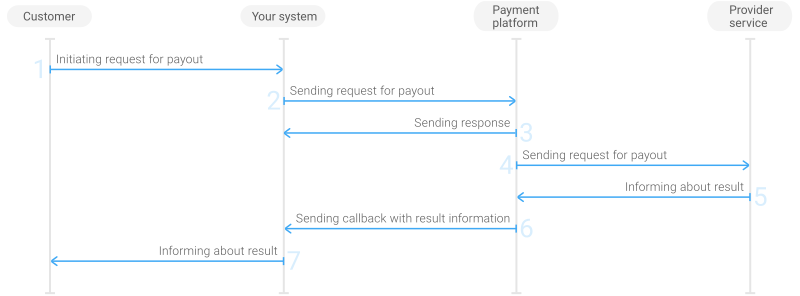
- The customer initiates a payout in your system.
- Your system sends the payout request to the payment platform.
- The payment platform sends you a response in which it acknowledges your request and provides the request validation result.
- The payment platform processes the request and forwards it to the provider service.
- The provider service informs the payment platform about the payout result.
- The payment platform sends a callback with the payout result to your system.
- Your system sends the payout result to the customer.
Usually, the response to the request is sent to your system within 100 ms in any of the above cases. If no response is received, you can repeat the request using the same payment data and payment identifier. In case of an error response with error information specified, resend the request upon fixing the specified error.
Request format
// Example of payout request. PHP
require_once 'Signer.php';

$payoutUrl = 'http://gate.test/v2/payment/card/payout';
$projectId = 200;
$secretKey = '123';

$requestParams = [
    'general' => [
        'project_id' => $projectId,
        'payment_id' => microtime(),
    ],
    'payment' => [
        'amount'   => 100,
        'currency' => 'KZT',
    ],
    'customer' => [
        'id' => 'test_customer_id',
        'ip_address'=> '14.192.204.152',
        'email'=> 'janedoe@example.com',
    ],
    'account' => [
        'bank_id' => 14,
        'customer_name' => 'Jane Doe',
        'number' => '314159265358979',
    ],
];

$requestParams['general']['signature'] = Signer::sign($requestParams, $secretKey);

$ch = curl_init();

curl_setopt($ch, CURLOPT_URL, $payoutUrl);
curl_setopt($ch, CURLOPT_POST, 1);
curl_setopt($ch, CURLOPT_POSTFIELDS, json_encode($requestParams));
curl_setopt($ch, CURLOPT_RETURNTRANSFER, true);

$response = curl_exec($ch);

if (!$response) {
    print_r(curl_error($ch));
} else {
    print_r($response);
}

curl_close($ch);
# Example of payout request. Python
from datetime import datetime
from Signer import Signer
import requests
import json
payoutUrl = 'http://gate.test/v2/payment/card/payout'
secretKey = '123'
projectId = 200
params = {
'general': {
'project_id': 200,
'payment_id': 'X03936'
},
'payment': {
'amount': 122990,
'currency': 'KZT'
},
'customer': {
'id': 'customer_173',
'ip_address': '1.2.3.4',
'email': 'janedoe@example.com'
},
'account': {
'bank_id': 114,
'customer_name': 'Jane Doe',
'number': '314159265358979'
}
}
print(json.dumps(params))
signer = Signer()
params['general']['signature'] = signer.getSign(params, secretKey)
r = requests.post(
payoutUrl,
json=params
)
print(r.status_code, r.reason)
print(r.text[:300])// Example of payout request. Java
const signer = require('./Signer');
const request = require('request'); // npm install request
const secretKey = '123';
const params = {
'general': {
'project_id': 200,
'payment_id': 'X03936'
},
'payment': {
'amount': 122990,
'currency': 'KZT'
},
'customer': {
'id': 'customer_173',
'ip_address': '1.2.3.4',
'email': 'janedoe@example.com'
},
'account': {
'bank_id': 114,
'customer_name': 'Jane Doe',
'number': '314159265358979'
}
};
params['general']['signature'] = (new signer()).getSign(params, secretKey);
const opts = {
uri: 'http://gate.test/v2/payment/card/payout',
method: 'POST',
json: params
};
request(opts, function (error, response, body) {
if (error || response.statusCode !== 200) {
console.log('request got an error:');
console.log(body);
return
}
console.log('request got OK');
console.log(body);
});Figure 12. Example of request data for processing a payout to a payment card
{
    "general": {
        "project_id": 1234,
        "payment_id": "payment_47",
        "signature": "PJkV8ej\/UG0Di8hTng6JvC7vQsaC6tajQVVfBaNIipTv+AWoXW\/9MTO8yJA=="
    },
    "customer": {
        "id": "customer_123",
        "ip_address": "198.51.100.47",
        "first_name": "John",
        "last_name": "Doe",
        "middle_name": "Paul",
        "email": "johndoe@example.com"
    },
    "payment": {
        "amount": 1000,
        "currency": "KZT"
    },
    "card": {
        "pan": "1122334455667788",
        "card_holder": "JOHN DOE"
    }
}
To make a payout, send a request to the payment platform with the use of the POST method. The request is an HTTP message with a predefined structure. Each request must have the following elements passed in the given order:
- The start-line with the request method (
POST), the endpoint of the Gate interface, and the protocol with its version (HTTP/1.1) specified. Available endpoints:- /v2/payment/card/payout—for payment cards
- /v2/payment/mobile/payout—for mobile commerce
- The header with the
Hostfield that contains the domain name for sending the requests to the platform. - An empty line which serves as a separator between the request header and the body.
- The request body in the JSON format with the request data and the signature. Only Unicode characters (UTF-8) are allowed in the request body.
Besides the mandatory Host field, the header may include any other fields supported by HTTP version 1.1.
When creating a JSON string, use the following required objects and parameters:
| Object | Parameter | Description |
|---|---|---|
|
general |
project_id |
Project ID you obtained from Paytransfer when integrating. Example: |
|
payment_id |
Payment ID unique within your project. Example: |
|
|
signature |
Signature created after you've specified all the request parameters. For more information about signature generation, see Signature generation and verification. | |
|
customer |
id |
Unique ID of the customer within your project. Example: |
|
ip_address |
IP address of the customer's device. Example: |
|
|
email |
Customer's email. Example: |
|
|
payment |
amount |
Payout amount in minor currency units without any decimal point or comma except for the cases when the currency doesn't have any minor currency units. If the currency doesn't have any minor units (i.e. the number of digits for minor currency units is zero), set this parameter to the amount in the major currency units. To check whether the currency has any minor units, see Currency codes. Example: 100.00 USD must be sent as |
|
currency |
Code of the payout currency in the ISO-4217 alpha-3 format. Example: |
Depending on payment method, you may also need to add some of the parameters from the following table:
| Payment method | Additional parameters list |
|---|---|
| Payment cards |
|
| Mobile commerce |
|
Payment statuses
The following table describes the statuses that may be assigned to the payout during the payment processing procedure.
error |
The payment has not been initiated due to an error detected by the payment platform when the request was checked for correctness. Final status. The request can be resent with the same payment identifier. |
processing |
The payment is being processed. Intermediate status |
decline |
The payment has been declined. Final status |
success |
The payment has been completed. Final status |
Payment methods
Payment cards
Payment cards (Visa, Mastercard), a popular payment method, offers your customers a convenient way of paying for your services and receiving payouts.
Refer to your key account manager at Paytransfer to find out the exact payment amount limits relevant to you. You can also check the payment amount limits in your project by using Dashboard. To check your payment amount limits, go to Dashboard, select the Projects section and click the Payment methods tab.
Download the payment method logo here.
Mobile commerce
Mobile Commerce, a popular payment method, offers your customers a convenient way of paying for your services and receiving payouts.
Refer to your key account manager at Paytransfer to find out the exact payment amount limits relevant to you. You can also check the payment amount limits in your project by using Dashboard. To check your payment amount limits, go to Dashboard, select the Projects section and click the Payment methods tab.
Download the payment method logo here.
Special aspects
You should take into account the following special aspects when making payments:
- Contact your key account manager at Paytransfer to find out whether refund is available in your case.
- The mobile network operator service generates the OTP code and sends it to the customer in a message.
The customer enters the OTP in your system. You should submit this code to the payment platform in a new request. For more information, see Submission of additional payment information. You should include the additional_data object in this request as described below.
| Objects and parameters | Description | ||
|---|---|---|---|
|
additional_data |
additional_data |
approval_code |
The OTP the customer receives in a message from the mobile network operator. Example: |
Supported mobile network operators
IDs of the mobile network operators available for performing payments:
- Activ—
ACTIV - Altel—
ALTEL - Beeline—
BEELINE - Kcell—
KCELL - Tele2—
TELE2
Obtaining payment information
Overview
When working with the Paytransfer payment platform, you receive the current request processing information at the API level in the form of responses or callbacks.
- Responses. Responses are sent within a synchronous interaction during a single HTTP session. A response informs you either that the request has been accepted for further processing or that the request processing has been finished due to errors (in this case, the response contains the error information).
- Callbacks. Callbacks are sent within an asynchronous interaction and contain the information about an intermediate or a final request processing result.
For obtaining updated and relevant information about the request processing, you can also use the Dashboard interface.
Response structure
The Paytransfer payment platform responds with an HTTP response message to each request received from your system within the same HTTP session. The requested data of the response body varies depending on the interaction model and the result of request handling. The response can contain the following:
- Information that request is accepted for processing—if the payment platform successfully accepts the request for processing
- Extended error description—if the payment platform cannot accept the request for processing
This section covers the structure of such responses as well as their status codes and statuses used to indicate the request status; for information about the unified response codes used in the data transferred within the responses, see Operation statuses and response codes.
Response structure
Each HTTP response to your system includes the following elements in the given order:
- The status line which contains the following: the protocol and its version (usually, it is
HTTP/1.1), status code and reason phrase (for instance,200 OK) - Header fields
- An empty line which serves as a separator between the response header and the body
- The response body in the JSON format with the response data and the signature. Only Unicode characters (UTF-8) are used in the response body
Response status code
Status codes are used in status line to communicate successful or failed request acceptance or execution as well as to provide error cause. These status codes and reason phrases are listed in the following table.
| Status code | Description |
|---|---|
| 200 OK |
This response only means that the request is successfully accepted for processing. The payment platform will return the requested information in an intermediate or final asynchronous callback. |
| 400 Bad Request | The request cannot be accepted because of the missing mandatory parameter in JSON data, for example the project ID (project_id) is missing. |
| 403 Forbidden | The request cannot be accepted because the access to the requested (valid) endpoint is forbidden, for instance because the IP from which the request originates is not included in allowed IPs list. |
| 404 Not Found | The request cannot be accepted because the value of project_id is incorrect. |
| 422 Unprocessable Entity | The request cannot be accepted because of malformed syntax in JSON string, for instance, a comma is missing. |
| 500 Internal Error | The request cannot be processed because of the payment platform error. This response indicates only difficulties with processing the request in the payment platform and indicate nothing about either request processing or the request results. For example, a response with the |
Request status
Response body may include the status parameter to communicate that the request has been or has not been accepted for processing. There are two statuses:
success—the request is accepted for processing. This status is specified in responses with200status-code only.error—the request is not accepted for processing. This status is specified in responses with400, 403, 404, 422, and 500status-codes.
Asynchronous responses
If the payment platform successfully accepts the request for processing, it responds with the line including 200 code as well as the response body that contains the success status.
If the payment platform cannot handle the request, it responds with status line including error code (for instance 400), as well as response body including error status and extended error description with the error code that the payment platform provided (for instance 2004) and its description (for instance Required field not provided). Incorrect requests are discarded and not accepted for processing.
Callbacks
Overview
Figure 14. Callback body with payment result
 {
        "project_id": 200,
        "payment": {
            "payment_id": "cosmo_set_4589",
            "type": "purchase",
            "status": "success",
            "date": "2020-07-20T07:12:04+0000",
            "method": "card",
            "sum": {
                "amount": 131970,
                "currency": "KZT"
            },
            "description": "Sports equipment"
        },
        "customer": {
            "id": "customer_173",
            "ip_address": "198.51.100.47",
            "phone": "+60-3-xxxx-xxxx",
            "email": "jane.doe@example.com"
        },
        "operation":{
            "id": 003,
            "type": "sale",
            "status": "success",
            "date": "2020-07-20T07:12:04+0000",
            "sum_initial": {
                "amount": 131970,
                "currency": "KZT"
            },
            "code": "0",
            "message": "Success"
        },
        "signature": "qV2FRs/wxoOaywQS0GYQDi+6spZFbiRXxt8zG10zy9TNiJLT0P/+EOrpMkoW80mynkaQfSAUJpfQ=="
    }
In the asynchronous interaction model, the Paytransfer payment platform returns intermediate and final results with callbacks to your system URLs. This section covers the structure of callbacks.
Each callback from the payment platform must include the following elements in the given order:
- The start line which specifies the HTTP method (always
POST), your system endpoints for callbacks with results (for instance,/notify/success), and the protocol and its version (normally it isHTTP/1.1). - The header with the
Hostfield that contains the domain name of your system (for instance,webservice.com). - An empty line which serves as a separator between the callback header and the body.
- The callback body in the JSON format with the result data and the signature. Only Unicode characters (UTF-8) are used in the callback body.
Callbacks are signed; for more information, see Signature generation and verification.
On the right, there is an example of a callback body with payment result. JSON string is formatted for better readability.
Callback delivery
Callbacks are sent immediately after an operation was performed.
The payment platform records the fact of callback delivery to your system after receiving the response from your system. The response must contain an HTTP header with code 200 OK.
If it is necessary, you can delay the callback sending by passing the delay parameter in the callback object in the payment request with the value in seconds. The maximum delay value is 600 seconds.
If the callback was not delivered, it is resent according to the following schedule:
- 6 times with the 10 sec period;
- then the period is increased in accordance with the formula
70 + 10·1,12n-4, where n is the serial number of the attempt, until the period does not exceed 4 hours; - after that, every 4 hours until the maximum number of attempts is achieved.
The payment platform performs at maximum 120 attempts to deliver a callback within 11 days.
Callback delivery addresses
Figure 15. Example of the data from a request to open the checkout page containing the URL to send callbacks to for this payment
{
        project_id: 1234,
        payment_id: 'payment_47',
        customer_id: 'customer_123',
        customer_first_name: 'John',
        customer_last_name: 'Doe',
        customer_email: 'johndoe@example.com',
        merchant_callback_url: 'http://example.com/callback',
        payment_currency: 'KZT',
        payment_amount: 10000,
        signature: 'kUi2x9dKHAVNU0FYldJrxh4yo+52Kt8KU+Y19vySO\/RLUkDJrOcZzUCwX6R\/ekpZhkIQg=='
    }
Figure 16. Example of the data from a payout request containing the URL to send callbacks to for this payment
{
    "general": {
        "project_id": 1234,
        "payment_id": "payment_47",
        "merchant_callback_url": "http://example.com/callback",
        "signature": "PJkV8ej\/UG0Di8hTng6JvC7vQsaC6tajQVVfBaNIipTv+AWoXW\/9MTO8yJA=="
    },
    "customer": {
        "id": "customer_123",
        "ip_address": "198.51.100.47",
        "first_name": "John",
        "last_name": "Doe",
        "email": "johndoe@example.com"
    },
    "account": {
        "number": "123456789"
    },
    "payment": {
        "amount": 10000,
        "currency": "KZT"
    }
}
The Paytransfer payment platform sends callbacks to the URL that you provide Paytransfer with when integrating. If you have several projects, you can provide Paytransfer with individual URLs for each project.
You can provide Paytransfer with individual URLs to receive callbacks with certain information about the payment, e.g. for the payment platform to send you callbacks for successfully performed payments to one URL and callbacks for the declined ones to the other. You can also use individual URLs to receive callbacks for the payments of a certain type.
You can specify individual URLs for receiving callbacks yourself by using Dashboard. To do so, go to Dashboard, select the Projects section, and then click the Callbacks tab. The tools in Dashboard allow you to specify in what cases and what URLs Paytransfer will send callbacks to.
Please note that your system must accept callbacks only from the IP address you receive from Paytransfer when integrating. To double-check the IP address, contact the Paytransfer technical support.
Callback delivery addresses for a specific payment
You can also specify an individual URL for receiving callbacks for a specific payment. To do so:
- add the merchant_callback_url parameter to the request for opening the checkout page and set its value to the URL that Paytransfer should use to send callbacks to
- add the merchant_callback_url parameter to the general object of your payout request and set its value to the URL that Paytransfer should use to send callbacks to
After that the payment platform will send all the callbacks related to the payment (and only to this payment) to the URL passed in the request ignoring the callback URLs configured in your project.
Callback processing
When processing callbacks, your system must follow the following guidelines:
- Accept callbacks only from the IP address provided by the Paytransfer technical support.
- Your system must respond with
HTTP 200 OKto a successfully received callback . - If a callback has been already received by your system, your system must respond with
HTTP 200 OKas well. - If a callback wasn't received, your system must respond with
HTTP 400 Bad Request(for example, if you were unable to convert a parameter string to an array) orHTTP 500 Internal Server Error(for example, if a callback was sent to the wrong URL). - For a callback that was not previously received, your system must try to accept the callback again.
- Your system should not limit the delivery time for callbacks because deliveries can occur with delays.
Figure 17. Example of a response to a callback
HTTP/1.1 200 OK
Date: Fri, 07 Jun 2019 11:38:32 GMT
Content-Type: text/plain;charset=UTF-8
Content-Length: 2
Connection: keep-alive

OK
Callback parameters
The parameters that are passed in callbacks may differ depending on the request. Additionally you can extend the list of parameters that are sent in callbacks for your project. To extend the parameter set, contact technical support specialists at support@paytransfer.kz
The typical set of parameters in callbacks that the payment platform sends after payment processing is described below.
| Parameter | Description | tree |
|---|---|---|
|
customer |
The object that contains information about the customer who initiated the payment. | 70 |
|
id |
Unique ID of the customer in your project. | 70-60 70 |
|
ip_address |
Customer IP address as specified in the initial request. | 70-70 70 |
|
phone |
Customer phone number. From 4 to 24 digits | 70-100 70 |
|
email |
Customer email | 70-120 70 |
|
operation |
The object that contains information about the operation that triggered the callback | 130 |
|
code |
Unified payment provider response code. For the list of the codes, see Operation statuses and response codes | 130-10 130 |
|
date |
Date and time the payment status was last updated | 130-30 130 |
|
id |
Unique ID of the operation. | 130-50 130 |
|
message |
Unified message from the payment provider. For more information about the response codes, see Operation statuses and response codes | 130-60 130 |
|
status |
Operation status. For more information about operation statuses, see Operation statuses and response codes | 130-90 130 |
|
sum_converted |
The object that contains the currency of the payment provider account and the initial amount denominated in this currency. | 130-100 130 |
|
amount |
The amount in minor units of the payment provider currency | 130-100-10 130-100 |
|
currency |
The currency of the payment provider account in ISO 4217 alpha-3 format. Example: |
130-100-20 130-100 |
|
sum_initial |
The object that contains the amount and currency of the operation as specified in the initial request. | 130-110 130 |
|
amount |
The operation amount as specified in the initial request in minor units of the currency. | 130-110-10 130-110 |
|
currency |
Payment currency in ISO 4217 alpha-3 format as specified in the initial request. Example: |
130-110-20 130-110 |
|
type |
The operation type | 130-120 130 |
|
payment |
The object that contains the payment data | 140 |
|
date |
Date and time of the last payment status update Example: |
140-20 140 |
|
description |
The description of the payment as specified in the initial request | 140-30 140 |
|
id |
Unique ID of the payment in your system | 140-40 140 |
|
status |
Payment status Example: |
140-90 140 |
|
sum |
The object that contains the information about payment amount and the currency as specified in the initial request | 140-100 140 |
|
amount |
Payment amount in minor currency units | 140-100-10 140-100 |
|
currency |
Payment currency in ISO 4217 alpha-3 format as specified in the initial request. Example: |
140-100-20 140-100 |
|
type |
Payment type. Example: |
140-120 140 |
|
project_id |
The unique ID of your project | 150 |
|
signature |
Callback signature. For more information, see Signature generation and verification. | 190 |
Operation statuses and response codes
The current state of the operation created as a part of the payment in the Paytransfer payment platform is indicated by its status. The payment platform communicates the operation status in the intermediate and final callbacks in the status parameter inside the operation object. Alternatively, you can check any operation status by using Dashboard.
Besides the statuses, the payment platform uses service codes and messages which specify information about the current operation or the possible reasons for declining the operation, including the reasons received from any external payment systems. All the response and error codes, as well as its related messages are unified in the payment platform to make it convenient to convey the information. The unified codes and messages are sent to your system the same way as the status in the operation.code and operation.message parameters. You can also view this information in Dashboard in the payment details.
Figure 18. Callback snippet with the information about the current operation
"operation":{
            "id": 003,
            "type": "sale",
            "status": "success",
            "date": "2020-07-20T07:12:04+0000",
            "sum_initial": {
                "amount": 131970,
                "currency":
                    },
            "code": "0",
            "message": "Success"
        }
If an error occurs during payment request processing, it is indicated by the error request status. Since the operation is not created in this case, the payment platform sends error data in a synchronous response in the code and message parameters. For more information and examples of synchronous error responses, see Response structure.
You may be required to act on some errors. The following table suggests the actions you can take when you receive certain payment status and error code.
| Statuses | Comment | Action |
|---|---|---|
success |
Operation is performed. There are no further actions required | No action required |
|
Operation is in progress | You should wait. |
decline |
Operation was declined: by a customer, by exceeding the requests number limit, by net connection failure or by insufficient funds on the customer account at current moment | Resend the request immediately or after a while. |
| Operation was declined due to incorrect data in the request. Eliminate the error on your side by correcting the request or contact the technical support for help | Correct the request and resend it. | |
| Operation processing was declined due to a technical failure, contact the technical support | Contact the technical support. | |
| Operation was declined by the risk control system (RCS) or due to other reasons that cannot be eliminated. Comments on the decline can be obtained from the technical support | No action required. | |
error |
Error occurred while operation request processing. Operation is not performed | Correct the request and resend it. |
The possible values of the codes and the messages that are displayed to customers, and further actions suggested to you are given in the tables below.
| 3283 | Refund amount more than initial amount | Refund amount is more than initial amount | Correct and resend the request. |
| 3284 | Refund currency mismatched or empty | Refund currency mismatches or is empty | Correct and resend the request. |
| 3285 | Cannot make refund because of timeout block for repeat refund | The operation was rejected due to restrictions on the frequency of refund requests | Contact the technical support. |
| Code | Message | Description | Action |
|---|---|---|---|
| 20000 | General decline | Operation was declined for an unknown reason | Resend the request |
| 20100 | Declined by external provider | Operation was declined by PSP without explanation | Resend the request. |
| 20101 | Decline due to amount or frequency limit | Operation was declined due to limitation of amount or frequency | Correct the request before resending or resend the request later |
| 201011 | Decline due to amount limit | Operation was declined due to limitation of amount | Correct and resend the request. |
| 201012 | Decline due to amount limit per period for the customer | Operation was declined due to limitation of payment amount per period for a customer | Resend the request later. |
| 201013 | Decline due to frequency limit | Operation was declined due to limitation of payment attempts frequency | Resend the request later. |
| 201014 | Too much declined operations per period for the customer | Operation was declined due to limitation of payment attempts frequency per period for a customer | Resend the request later. |
| 20102 | Incorrect account data entered | Operation was declined due to incorrect account data entry | Correct and resend the request. |
| 20103 | Incorrect login or password | Operation was declined due to incorrect customer login or password entry | Correct and resend the request. |
| 20104 | Password attempts entry exceeded | Operation was declined due to multiple entry of incorrect password | Resend the request. |
| 20105 | Insufficient funds on customer account | Operation was declined due to insufficient funds on the customer account | Resend the request. |
| 20106 | Customer account is no longer available | Operation was declined due to the customer account is expired or unavailable | Correct and resend the request. |
| 20107 | Customer account does not support requested currency | Operation was declined due to the customer account does not support requested currency | Correct and resend the request. |
| 20201 | Restrictions for the customer account | Operation was declined due to restrictions on customer account. Contact the PSP | Correct and resend the request. |
| 20202 | PSP system is unavailable | Operation was declined due to the unavailability of PSP. Please try again later | Resend the request. |
| 20203 | Compromised customer account | Operation was declined due to a special response from the bank: customer account was compromised | No action required. |
| 20204 | Crediting this customer account is blocked | Operation was declined. The customer account is not allowed to perform crediting. Contact the PSP | Correct and resend the request. |
| 20205 | Payment method is not available for customer country | Payment method is not available for customer country | No action required. |
| 20206 | Difficulties on the mobile operator side | Operation was declined due to the technical problems on the mobile operator side | Resend the request later. |
| 20301 | Account owner cancelled operation | Operation was declined by the account owner | Resend the request. |
| 20302 | Unacceptable password | Password does not meet the requirements. Please try another | Correct and resend the request. |
| 20303 | Customer is not permitted to perform the action | Request is prohibited due to lack of permits | Correct and resend the request. |
| 20304 | Incorrect amount paid | Operation was declined due to incorrect amount paid by a customer | Resend the request. |
| 20401 | Declined by PSP risk system | Operation was declined by PSP risk department. Do not show this message to a customer | Correct and resend the request. |
| 20402 | Suspicious operation | Operation was declined by PSP anti-fraud system | No action required. |
| 20501 | Refer to acquirer | Operation was declined due to incorrect interaction with PSP | Contact the technical support. |
| 20502 | Error during operation validation | Operation was declined during the operation validation process | Correct and resend the request. |
| 20503 | Incorrect acquirer settings | Operation was declined due to incorrect settings. Contact the acquirer | Contact the technical support. |
| 20504 | Insufficient funds on acquirer balance | Operation was declined due to insufficient funds on the acquirer balance | Contact the technical support. |
| 20601 | Try again | Operation was declined. Please try again | Resend the request. |
| 20602 | Time-out | Operation was declined due to time-out. Please try again | Resend the request. |
| 20603 | Operation could not be authorized. Try again later | Operation cannot be authorized now. Please try again later | Resend the request. |
| 20604 | Notification is not delivered | Operation was declined. Notification cannot be delivered | Contact the technical support. |
| 20701 | Wrong requests sequence | Operation was declined due to incorrect sequence of requests | Correct and resend the request. |
| 20702 | Invalid request. Try again | Operation was declined due to malformed format of the request | Contact the technical support. |
| 20705 | Merchant account is blocked | Operation was declined due to the merchant’s account being blocked | Contact the technical support. |
| 20706 | Operation not supported by provider | Operation was declined because the provider does not support this type of operation | Contact the technical support. |
| 20801 | Payment provider approved but did not process the operation | Payment provider approved but did not process the operation | Contact the technical support. |
| 20802 | The payment provider did not confirm neither successful nor negative status of the payment transaction | The payment provider cannot confirm status of the payment | It is necessary to wait |
| 29999 | Awaiting processing | Awaiting external processing. Please wait | It is necessary to wait |
Analysis of payment results
You can load and analyze all the necessary information in Dashboard (dashboard.paytransfer.kz), for instance you can use the analytic panels in the Analytics section for this purpose.
Dashboard allows you to download reports in CSV format by using the tools in the Reports section. You can perform export as a one-time or regular download of data to your local computer.
If you have any further questions regarding payment data analysis, contact Paytransfer technical support specialists.
Signature generation and verification
Overview
The data communication between your system and the Paytransfer payment platform is protected by using the TLS protocol version 1.2 or later. This ensures the confidentiality of the data being transmitted, though the protocol cannot guarantee the message integrity and ensure that the message author possesses the secret key. Therefore, every message must be digitally signed by using the secret key issued by Paytransfer for your system and known only to you and the Paytransfer payment platform.
Regardless of the interface that is used for working with the payment platform, digital signatures should be included in all requests, callbacks, and certain responses. The responses that do not include signatures are usually the ones that contain only auxiliary information (for example, the response stating that the request has been declined due to the incorrect data) or general information without the payment or customer details (for example, the response containing the list of available banks). In other cases, signatures are included in the responses.
Thus, before you submit a request to the payment platform, a digital signature should be generated and included in the request; after the callbacks and responses that contain signatures have been received from the payment platform, it is necessary to verify the received data by comparing the signatures to the ones generated on your side. The data integrity can be compromised for various reasons, but whenever such cases are detected, this data should not be considered valid.
This section describes the algorithms for the digital signature generation and the data integrity verification, including examples with the use of these algorithms and interactive forms for testing the workflows using signatures.
Signature generation
Signing algorithm
The algorithm input includes the following:
- Data to sign.
Generally, this is all the parameters or JavaScript object configObj with all its parameters except for the
signatureparameter. - Signing key.
For the purposes of debugging and testing your signing algorithm implementation, you are free to use any signing key. For signing requests in production environment, you are required to use your production secret key.
Depending on the algorithm implementation, its output may be either signature or signed data. Generally, the algorithm output consists of the object with integrated signature parameter.
The algorithm description and the example below include the most common algorithm implementation that includes JavaScript object configObj as input (without the signature parameter) and output (with the signature parameter).
- Input validation Make sure the following requirements are met:
- Data conforms to the JavaScript object format.
- Data to sign does not contain any
signatureparameter even if it is empty. - The signing key is readily available.
- Conversion of all the strings to UTF-8 with alphabetical sorting. Complete the following steps:
- Encode any Boolean values as follows: replace
falsewith0, replacetruewith1.Note that this rule applies only to Boolean values. If any string parameter contains
"false"or"true"string value, the value is not replaced with0or1but is treated as any other string value. - Leave any empty parameter values empty. In other words, do not replace any empty values with blank space or
null. For instance,"payment_description":""is replaced withpayment_description:. - Convert all strings to UTF-8.
- Sort the strings in alphabetical order and join them in a single string by using semicolon (;) as a delimiter.
- Encode any Boolean values as follows: replace
- Calculating HMAC code by using the key and the SHA-512 hash function Calculate the HMAC code for the string by using the SHA-512 hash function and secret key. The HMAC code must be calculated as raw binary data.
- Encoding the HMAC code by using the Base64 scheme Encoding the HMAC code by using the Base64 scheme to obtain the signature for the initial data.
- Adding signature Add the
signatureparameter to the JavaScript object configObj using the signature from the previous step as its value.
// Example of signature generation. PHP
class Signer
{
    const ALGORITHM = 'sha512';
    const ITEMS_DELIMITER = ';';
    const MAXIMUM_RECURSION_DEPTH = 3;
/** * Generate signature * * @param array $params * @param string $secretKey * @param array $ignoreParamKeys * @param bool $doNotHash * @param bool $useUnlimitedRecursionDepth * * @return string */ public static function sign(array $params, string $secretKey, array $ignoreParamKeys = [], bool $doNotHash = false, bool $useUnlimitedRecursionDepth = false): string { $paramsPrepared = self::getParamsToSign($params, $ignoreParamKeys, 1, '', $useUnlimitedRecursionDepth); $stringToSign = implode(self::ITEMS_DELIMITER, $paramsPrepared);
return $doNotHash ? $stringToSign : base64_encode(hash_hmac(self::ALGORITHM, $stringToSign, $secretKey, true)) ; }
/** * Get parameters to sign * * @param array $params * @param array $ignoreParamKeys * @param int $currentLevel * @param string $prefix * @param bool $useUnlimitedRecursionDepth * * @return array */ private static function getParamsToSign( array $params, array $ignoreParamKeys = [], int $currentLevel = 1, string $prefix = '', bool $useUnlimitedRecursionDepth = false ): array { $paramsToSign = [];
foreach ($params as $key => $value) { if (in_array($key, $ignoreParamKeys, true)) { continue; }
$paramKey = ($prefix ? $prefix . ':' : '') . $key;
if (is_object($value)) { $value = get_object_vars($value); }
if (is_array($value)) { if (!$useUnlimitedRecursionDepth && ($currentLevel >= self::MAXIMUM_RECURSION_DEPTH)) { $paramsToSign[$paramKey] = (string)$paramKey.':'; } else { $subArray = self::getParamsToSign($value, $ignoreParamKeys, $currentLevel + 1, $paramKey, $useUnlimitedRecursionDepth); $paramsToSign = array_merge($paramsToSign, $subArray); } } else { if (is_bool($value)) { $value = $value ? '1' : '0'; } else { $value = (string)$value; }
$paramsToSign[$paramKey] = (string)$paramKey.':'.$value; } }
if ($currentLevel == 1) { ksort($paramsToSign, SORT_NATURAL); }
return $paramsToSign; } }
# Example of signature generation. Python
import hmac
import base64
import hashlib

class Signer:
    def getSign(self, params, key):
        byteKey = key.encode()
        paramsPrepared = self.getParamsToSign(params)
        toSignString = ';'.join(paramsPrepared.values())
        hmacObj = hmac.new(byteKey, toSignString.encode(), hashlib.sha512)

return base64.b64encode(hmacObj.digest())

def getParamsToSign(self, params, currentLevel = 1, prefix = '', useUnlimitedRecursionDepth = False):
        paramsToSign = dict()

for paramKey in params.keys():

newParamKey = (prefix + ':' if prefix else '') + paramKey

if isinstance(params[paramKey], (dict)):
                if useUnlimitedRecursionDepth is False and (currentLevel >= 3):
                    paramsToSign[newParamKey] = newParamKey + ':'
                else:
                    subDict = self.getParamsToSign(params[paramKey], currentLevel + 1, newParamKey, useUnlimitedRecursionDepth)
                    paramsToSign.update(subDict)
            else:
                if isinstance(params[paramKey], (bool)):
                    value = '1' if params[paramKey] == True else '0'
                else:
                    value = str(params[paramKey])

paramsToSign[newParamKey] = str(newParamKey + ':' + value)

sortedParams = dict()

for key in sorted(paramsToSign.keys()):
            sortedParams[key] = paramsToSign[key]

return sortedParams
// Example of signature generation. Java
const CryptoJS = require('crypto-js'); // npm install crypto-js

class Signer {
    getSign(params, key) {
        const paramsPrepared = this.getParamsToSign(params, 1);

const joinedString = Object.values(paramsPrepared).join(';');

const hash = CryptoJS.HmacSHA512(joinedString, key);

return hash.toString(CryptoJS.enc.Base64);
    }

getParamsToSign(params, currentLevel = 1, prefix = '', useUnlimitedRecursionDepth = false) {
        let paramsToSign = {};
        let value = '';

let keys = Object.keys(params);
        let key = '';
        for (let i = 0; i < keys.length; i++) {
            key = keys[i];

let paramKey = (prefix ? prefix + ':' : '') + key;

if (typeof params[key] === 'object') {
                if (!useUnlimitedRecursionDepth && (currentLevel >= 3)) {
                    paramsToSign[paramKey] = paramKey + ':';
                } else {
                    let subParams = this.getParamsToSign(params[key], currentLevel + 1, paramKey, useUnlimitedRecursionDepth);

Object.assign(paramsToSign, subParams);
                }
            } else {
                if (typeof params[key] === "boolean") {
                    value = params[key] === true ? '1' : '0';
                } else {
                    value = params[key].toString();
                }

paramsToSign[paramKey] = paramKey + ':' + value;
            }
        }

let orderedKeys = Object.keys(paramsToSign).sort();

let ordered = {};

for (let k = 0; k < orderedKeys.length; k++) {
            ordered[orderedKeys[k]] = paramsToSign[orderedKeys[k]];
        }

return ordered;
    }
}

module.exports = Signer;
Signature verification
Verification algorithm
The algorithm input includes the following:
- Signed data to verify.
Generally, this is callback or response body in JSON format with the
signatureparameter. - Verification key Note that it must be the same key you previously used for signing the data to verify.
Depending on the algorithm implementation, its output may be either a generated signature or the information whether the generated signature matches the one included in the response or callback.
The algorithm description and the example below use the most common algorithm implementation that includes callback or response body in JSON format as input (without the signature parameter) and output (with the signature parameter) which is the result of signature verification.
Thus, the algorithm includes the following steps:
- Input validation Make sure the following requirements are met:
- Data conforms to the JSON format.
- Data to sign contains a
signatureparameter with the signature value. - The signing key is readily available.
- Extracting signature from the data to verify Store the value of the
signatureparameter value for further reference and remove the parameter from the input data. - Generate signature for the data to verify Complete steps 2 through 4 as specified in the signature generation algorithm description. (For more details, see the following link):
- Conversion of all the strings to UTF-8 with alphabetical sorting.
- Calculation of HMAC code by using the key and the SHA-512 hash function.
- Encoding the HMAC code by using the Base64 scheme.
- Signature matching Compare the generated signature with the signature stored in step 2. If the signatures match, the data are authentic and its integrity is considered confirmed; otherwise, the data is considered compromised and cannot be used for production purposes.
Example of callback verification
Suppose that you need to verify the signature in a callback in the following scenario:
Figure 20. Callback body
{
  "project_id": 200,
  "payment": {
    "id": "sports_eq_4589",
    "type": "purchase",
    "status": "success",
    "date": "2020-07-20T07:12:04+0000",
    "method": "World banks",
    "sum": {
      "amount": 131970,
      "currency": "USD"
    },
    "description": "Sports equipment"
  },
  "customer": {
    "id": "customer_173",
    "ip_address": "198.51.100.47",
    "phone": "+60-3-xxxx-xxxx",
    "email": "jane.doe@example.com"
  },
  "operation": {
    "id": 103,
    "type": "sale",
    "status": "success",
    "date": "2020-07-20T07:12:04+0000",
    "sum_initial": {
      "amount": 131970,
      "currency": "USD"
    },
    "code": "0",
    "message": "Success"
  },
  "signature": "qV2FRs/wxoOaywQS0GYQDi+6spZFbiRXxt8zG10zy9TNiJLT0P/+EOrpMkoW80mynkaQfSAUJpfQ=="
}- Signing key:
secret. - The callback body contains the following information illustrated by the example.
The signature is verified as follows:
Figure 21. The example of the parameter set after step 1
{
  "project_id": 200,
  "payment": {
    "id": "sports_eq_4589",
    "type": "purchase",
    "status": "success",
    "date": "2020-07-20T07:12:04+0000",
    "method": "World banks",
    "sum": {
      "amount": 131970,
      "currency": "USD"
    },
    "description": "Sports equipment"
  },
  "customer": {
    "id": "customer_173",
    "ip_address": "198.51.100.47",
    "phone": "+60-3-xxxx-xxxx",
    "email": "jane.doe@example.com"
  },
  "operation": {
    "id": 103,
    "type": "sale",
    "status": "success",
    "date": "2020-07-20T07:12:04+0000",
    "sum_initial": {
      "amount": 131970,
      "currency": "USD"
    },
    "code": "0",
    "message": "Success"
  },
  "signature": "qV2FRs/wxoOaywQS0GYQDi+6spZFbiRXxt8zG10zy9TNiJLT0P/+EOrpMkoW80mynkaQfSAUJpfQ=="
}
Figure 22. The example of the parameter set after step 2
project_id:200
payment:id:sports_eq_4589
payment:type:purchase
payment:status:success
payment:date:2020-07-20T07:12:04+0000
payment:method:World banks
payment:sum:amount:131970
payment:sum:currency:USD
payment:description:Sports equipment
customer:id:customer_173
customer:ip_address:198.51.100.47
customer:phone:+60-3-xxxx-xxxx
customer:email:jane.doe@example.com
operation:id:103
operation:type:sale
operation:status:success
operation:date:2020-07-20T07:12:04+0000
operation:sum_initial:amount:131970
operation:sum_initial:currency:USD
operation:code:0
operation:message:Success
Figure 23. The example of the parameter set after step 3
customer:email:jane.doe@example.com
customer:id:customer_173
customer:ip_address:198.51.100.47
customer:phone:+60-3-xxxx-xxxx
operation:code:0
operation:date:2020-07-20T07:12:04+0000
operation:id:103
operation:message:Success
operation:status:success
operation:sum_initial:amount:131970
operation:sum_initial:currency:USD
operation:type:sale
payment:date:2020-07-20T07:12:04+0000
payment:description:Sports equipment
payment:id:sports_eq_4589
payment:method:World banks
payment:status:success
payment:sum:amount:131970
payment:sum:currency:USD
payment:type:purchase
project_id:200
Figure 24. The example of the parameter set after step 4
customer:email:jane.doe@example.com;customer:id:customer_173;customer:ip_address:198.51.100.47;customer:phone:+60-3-xxxx-xxxx;operation:code:0;operation:date:2020-07-20T07:12:04+0000;operation:id:103;operation:message:Success;operation:status:success;operation:sum_initial:amount:131970;operation:sum_initial:currency:USD;operation:type:sale;payment:date:2020-07-20T07:12:04+0000;payment:description:Sports equipment;payment:id:sports_eq_4589;payment:method:World banks;payment:status:success;payment:sum:amount:131970;payment:sum:currency:USD;payment:type:purchase;project_id:200Figure 25. Signature obtained after step 5
k1P1qtiRjtFpwvU1JSVIVTIM/aEo7YxBBcOsPa6DyTmrfvdi/ti8dGlVzSrC6/T+C8JtIQfWeD7L2N15FnSEXw==- Remove the
signatureparameter and its value from the callback. - Convert all parameter strings to UTF-8 according to the algorithm description.
- Sort the strings in alphabetical order.
- Join all strings in a single string by using semicolon (;) as a delimiter.
- Calculate the HMAC code for the string by using the SHA-512 hash function and secret key, and then encode the HMAC code by using the Base64 scheme.
- Compare the generated signature and the one included in the callback.
In our case, the signature differ which means that the callback is invalid and must be ignored.
// Example of signature check. PHP
require_once 'Signer.php';

$secretKey = '123';

$requestBody = '{
  "project_id": 200,
  "payment": {
    "id": "sports_eq_4589",
    "type": "purchase",
    "status": "success",
    "date": "2020-07-20T07:12:04+0000",
    "method": "World banks",
    "sum": {
      "amount": 131970,
      "currency": "USD"
    },
    "description": "Sports equipment"
  },
  "customer": {
    "id": "customer_173",
    "ip_address": "198.51.100.47",
    "phone": "+60-3-xxxx-xxxx",
    "email": "jane.doe@example.com"
  },
  "operation": {
    "id": 103,
    "type": "sale",
    "status": "success",
    "date": "2020-07-20T07:12:04+0000",
    "sum_initial": {
      "amount": 131970,
      "currency": "USD"
    },
    "code": "0",
    "message": "Success"
  },
  "signature": "qV2FRs/wxoOaywQS0GYQDi+6spZFbiRXxt8zG10zy9TNiJLT0P/+EOrpMkoW80mynkaQfSAUJpfQ=="
}';

$requestBodyArray = json_decode($requestBody, true);

$actualSignature = $requestBodyArray['signature'];
unset($requestBodyArray['signature']);
$expectedSignature = Signer::sign($requestBodyArray, $secretKey);

print_r('Actual signature: ' . $actualSignature . PHP_EOL);
print_r('Expected signature: ' . $expectedSignature . PHP_EOL);

if ($expectedSignature === $actualSignature) {
    print_r('Signatures are equal');
} else {
    print_r('Signatures are not equal');
}

print_r(PHP_EOL);
# Example of signature check. Python
from Signer import Signer
import base64

secretKey = '123'
params = {
  "project_id": 200,
  "payment": {
    "id": "sports_eq_4589",
    "type": "purchase",
    "status": "success",
    "date": "2020-07-20T07:12:04+0000",
    "method": "World banks",
    "sum": {
      "amount": 131970,
      "currency": "USD"
    },
    "description": "Sports equipment"
  },
  "customer": {
    "id": "customer_173",
    "ip_address": "198.51.100.47",
    "phone": "+60-3-xxxx-xxxx",
    "email": "jane.doe@example.com"
  },
  "operation": {
    "id": 103,
    "type": "sale",
    "status": "success",
    "date": "2020-07-20T07:12:04+0000",
    "sum_initial": {
      "amount": 131970,
      "currency": "USD"
    },
    "code": "0",
    "message": "Success"
  },
  "signature": "qV2FRs/wxoOaywQS0GYQDi+6spZFbiRXxt8zG10zy9TNiJLT0P/+EOrpMkoW80mynkaQfSAUJpfQ=="
}

signer = Signer()
actualSign = params['signature']
del params['signature']
expectedSign = signer.getSign(params, secretKey).decode()

print('Actual signature:' + actualSign)
print('Expected signature:' + expectedSign)

if (expectedSign == actualSign):
    print('Signature is correct')
else:
    print('Signature is incorrect')
// Example of signature check. Java
const signer = require('./Signer');

const secretKey = '123';

const params = {
  "project_id": 200,
  "payment": {
    "id": "sports_eq_4589",
    "type": "purchase",
    "status": "success",
    "date": "2020-07-20T07:12:04+0000",
    "method": "World banks",
    "sum": {
      "amount": 131970,
      "currency": "USD"
    },
    "description": "Sports equipment"
  },
  "customer": {
    "id": "customer_173",
    "ip_address": "198.51.100.47",
    "phone": "+60-3-xxxx-xxxx",
    "email": "jane.doe@example.com"
  },
  "operation": {
    "id": 103,
    "type": "sale",
    "status": "success",
    "date": "2020-07-20T07:12:04+0000",
    "sum_initial": {
      "amount": 131970,
      "currency": "USD"
    },
    "code": "0",
    "message": "Success"
  },
  "signature": "qV2FRs/wxoOaywQS0GYQDi+6spZFbiRXxt8zG10zy9TNiJLT0P/+EOrpMkoW80mynkaQfSAUJpfQ=="
};

const actualSignature = params['signature'];
delete params.signature;
const expectedSignature = (new signer()).getSign(params, secretKey);

console.log('Actual: ' + actualSignature);
console.log('Expected: '+expectedSignature);

if (actualSignature == expectedSignature) {
    console.log('Signatures is correct');
} else {
    console.log('Signature is incorrect');
}
FAQ
General information
This section covers the answers to some questions you might have when interacting with the Paytransfer payment platform.
Haven't found the information you need? Contact our specialists:
- the key account manager—for business- and finance-related questions, e.g. the cost of services, calculating commissions, working with balance sheets, etc.
- the implementation manager—for discussing technical aspects, e.g. working with different interfaces, making requests, configuring callbacks, etc. Communication with your implementation manager takes place in the technical chat. If the chat hasn't been created yet, please contact your key account manager at Paytransfer to create it.
Frequently asked questions
Minor currency units is the number of decimal places (exponent) specified in the amounts after major currency units and a decimal point or comma. For example, in the 155.00 USD amount, 155 is the major currency unit, while 00 is the minor one. Often, the minor currency unit has a value that is 1/100 of the major unit, but 1/1000 is also common. Some currencies do not have any minor currency units at all.
In your requests, you must specify the amount value in the minor units without any decimal point or comma except for the cases when the currency doesn't have any minor currency units. Thus, the 10.00 USD amount must be sent as 1000 in the request.
If the currency doesn't have any minor units (i.e. the number of digits for the minor currency units is zero), the amount must be sent in the major currency units. For example, Vietnamese dongs don't have any decimals and therefore the 10 VND amount must be sent as 10 in the request.
To check whether the currency has any minor units, see Currency codes.
- Your system expects to get callbacks from the URL the Paytransfer integration team provided you with when integrating.
- The URL is correctly configured to accept HTTP requests from the payment platform: the Paytransfer IP addresses are included in the white list and are not blocked by the firewall or any other network equipment.
- The initial payment request doesn't contain the callback.force_disable parameter set to
1which prevents the payment platform from sending you callbacks for this payment.
You can check the payment or operation status in Dashboard. To do so, open the payments section and find the row with the payment you're interested in. You can also see detailed information on the payment details screen by clicking this row. When using Dashboard to check payment or operation status, keep in mind that the data there can be displayed with a little delay.
You can also check the payment or operation status in callbacks from the Paytransfer payment platform. To find information about the statuses that you can get in the callbacks from the payment platform, see the Operation statuses and response codes section.
- in a synchronous response to a request—in case of an error during the initial request processing. Find more information about this type of errors in the Response structure section.
- in an intermediate or final callback—through a response code and a message which are passed:
- in the
errorsarray—if the operation was rejected in the payment platform (for example, it failed the established business rules validation); - in the
operation.codeandoperation.messageparameters—if the operation was rejected by a provider or payment system.
To learn more information about callbacks, see the Callbacks section.
- in the
- on the payment details screen in Dashboard.
Currency units
Generally, when you make a request for a payment of any type you must provide the amount in minor currency units of the request currency without any decimal point or comma.
The minor unit (also called a subunit or fractional unit) is the smallest official unit of a currency that is commonly used in financial transactions. Think of it as the "small change" part of a currency. The Number of digits for minor currency units column in Currency codes shows the number of decimal places for the currencies supported by Paytransfer.
For example, for US dollar:
- Major unit: The main name of the currency—Dollar.
- Minor unit: The small part that makes up the major unit—Cent.
The value in the Number of digits for minor currency units column is 2.
So, if the request amount is 100.00 USD it should be specified as 100×102=10000 (that is, 10000 cents).
And if the currency does not have any minor currency units, then you are required to provide the amount in the major currency units. For example, the amount of 100 JPY is specified as 100×100=100.
Examples of the ratio of nominal and minor currency units are shown in the table below.
| Amount in nominal currency units | Amount in minor currency units |
|---|---|
| 450.66 GBP | 45066 |
| 39.95 USD | 3995 |
| 200 JPY | 200 |
| 150.15 KWD | 15015 |
References
Currency codes
Some details on currencies that are supported by Paytransfer are listed in this section. For each currency you can find: currency code according to ISO 4217 alpha-3, number of digits for minor currency units, name, and the countries where the currency is used.
Generally, the payment amount in requests is specified in minor currency units without any decimal point or comma. For example, the amount of 100.00 USD is specified as 10000 (that is, 10000 cents).
Although, if the currency does not have any minor currency units—that is, the value in the Number of digits for minor currency units column is zero, then you are required to provide the amount in the major currency units. For example, the amount of 100 JPY is specified as 100.
For details on getting minor currency units, see Currency units.
| Code | Fractional units number | Currency | Countries |
|---|---|---|---|
| AED | 2 | UAE Dirham | United Arab Emirates |
| AFN | 2 | Afghani | Afghanistan |
| ALL | 2 | Lek | Albania |
| AMD | 2 | Armenian Dram | Armenia |
| ANG | 2 | Netherlands Antillean Guilder | Curaçao |
| AOA | 2 | Kwanza | Angola |
| ARS | 2 | Argentine Peso | Argentina |
| AUD | 2 | Australian Dollar | Australia, Christmas Island, Cocos (Keeling) Islands, Heard Island and McDonald Islands, Kiribati, Nauru, Norfolk Island, Tuvalu |
| AWG | 2 | Aruban Florin | Aruba |
| AZN | 2 | Azerbaijan Manat | Azerbaijan |
| BAM | 2 | Convertible Mark | Bosnia and Herzegovina |
| BBD | 2 | Barbados Dollar | Barbados |
| BDT | 2 | Taka | Bangladesh |
| BGN | 2 | Bulgarian Lev | Bulgaria |
| BHD | 3 | Bahraini Dinar | Bahrain |
| BIF | 0 | Burundi Franc | Burundi |
| BMD | 2 | Bermudian Dollar | Bermuda |
| BND | 2 | Brunei Dollar | Brunei Darussalam |
| BOB | 2 | Boliviano | Bolivia (Plurinational State of) |
| BOV | 2 | Bolivian Mvdol | Bolivia (Plurinational State of) |
| BRL | 2 | Brazilian Real | Brazil |
| BSD | 2 | Bahamian Dollar | Bahamas |
| BTN | 2 | Ngultrum | Bhutan |
| BWP | 2 | Pula | Botswana |
| BYN | 2 | Belarusian Ruble (BYR) | Belarus |
| BZD | 2 | Belize Dollar | Belize |
| CAD | 2 | Canadian Dollar | Canada |
| CDF | 2 | Congolese Franc | Congo (Democratic Republic of the) |
| CHE | 2 | WIR Euro (complementary currency) | Switzerland |
| CHF | 2 | Swiss Franc | Liechtenstein, Switzerland |
| CHW | 2 | WIR Franc (complementary currency) | Switzerland |
| CLF | 4 | Unidad de Fomento | Chile |
| CLP | 0 | Chilean Peso | Chile |
| CNY | 2 | Yuan Renminbi | China |
| COP | 2 | Colombian Peso | Colombia |
| COU | 2 | Unidad de Valor Real (UVR) | Colombia |
| CRC | 2 | Costa Rican Colon | Costa Rica |
| CUC | 2 | Peso Convertible | Cuba |
| CUP | 2 | Cuban Peso | Cuba |
| CVE | 0 | Cabo Verde Escudo | Cabo Verde |
| CZK | 2 | Czech Koruna | Czech Republic |
| DJF | 0 | Djibouti Franc | Djibouti |
| DKK | 2 | Danish Krone | Denmark, Faroe Islands, Greenland |
| DOP | 2 | Dominican Peso | Dominican Republic |
| DZD | 2 | Algerian Dinar | Algeria |
| EGP | 2 | Egyptian Pound | Egypt |
| ERN | 2 | Eritrean Nakfa | Eritrea |
| ETB | 2 | Ethiopian Birr | Ethiopia |
| EUR | 2 | Euro | Andorra, Mayotte, Monaco, San Marino, Saint Pierre and Miquelon, European Union, except Bulgaria, Croatia, Czech Republic, Denmark, Hungary, Poland, Romania, Sweden |
| FJD | 2 | Fiji Dollar | Fiji |
| FKP | 2 | Falkland Islands Pound | Falkland Islands (Malvinas) |
| GBP | 2 | Pound Sterling | Guernsey, Isle of Man, Jersey, United Kingdom of Great Britain and Northern Ireland |
| GEL | 2 | Lari | Georgia |
| GHS | 2 | Ghana Cedi | Ghana |
| GIP | 2 | Gibraltar Pound | Gibraltar |
| GMD | 2 | Dalasi | Gambia |
| GNF | 0 | Guinean Franc | Guinea |
| GTQ | 2 | Quetzal | Guatemala |
| GYD | 2 | Guyana Dollar | Guyana |
| HKD | 2 | Hong Kong Dollar | Hong Kong |
| HNL | 2 | Lempira | Honduras |
| HRK | 2 | Kuna | Croatia |
| HTG | 2 | Gourde | Haiti |
| HUF | 2 | Forint | Hungary |
| IDR | 2 | Rupiah | Indonesia |
| ILS | 2 | New Israeli Shekel | Israel |
| INR | 2 | Indian Rupee | Bhutan, India |
| IQD | 3 | Iraqi Dinar | Iraq |
| IRR | 2 | Iranian Rial | Iran (Islamic Republic Of) |
| ISK | 0 | Iceland Krona | Iceland |
| JMD | 2 | Jamaican Dollar | Jamaica |
| JOD | 3 | Jordanian Dinar | Jordan |
| JPY | 0 | Yen | Japan |
| KES | 2 | Kenyan Shilling | Kenya |
| KGS | 2 | Som | Kyrgyzstan |
| KHR | 2 | Riel | Cambodia |
| KMF | 0 | Comoro Franc | Comoros |
| KPW | 2 | North Korean Won | Korea (The Democratic People's Republic Of) |
| KRW | 0 | Won | Korea (The Republic Of) |
| KWD | 3 | Kuwaiti Dinar | Kuwait |
| KYD | 2 | Cayman Islands Dollar | Cayman Islands |
| KZT | 2 | Tenge | Kazakhstan |
| LAK | 2 | Kip | Lao People's Democratic Republic |
| LBP | 2 | Lebanese Pound | Lebanon |
| LKR | 2 | Sri Lanka Rupee | Sri Lanka |
| LRD | 2 | Liberian Dollar | Liberia |
| LSL | 2 | Loti | Lesotho |
| LYD | 3 | Libyan Dinar | Libya |
| MAD | 2 | Moroccan Dirham | Morocco, Western Sahara |
| MDL | 2 | Moldovan Leu | Moldova (The Republic Of) |
| MGA | 2 | Malagasy Ariary | Madagascar |
| MKD | 2 | Denar | North Macedonia |
| MMK | 2 | Kyat | Myanmar |
| MNT | 2 | Tugrik | Mongolia |
| MOP | 2 | Pataca | Macau |
| MRU | 1 | Ouguiya | Mauritania |
| MUR | 2 | Mauritius rupee | Mauritius |
| MVR | 2 | Rufiyaa | Maldives |
| MWK | 2 | Kwacha | Malawi |
| MXN | 2 | Mexican Peso | Mexico |
| MXV | 2 | Mexican Unidad de Inversion (UDI) | Mexico |
| MYR | 2 | Malaysian Ringgit | Malaysia |
| MZN | 2 | Mozambique Metical | Mozambique |
| NAD | 2 | Namibia Dollar | Namibia |
| NGN | 2 | Naira | Nigeria |
| NIO | 2 | Cordoba Oro | Nicaragua |
| NOK | 2 | Norwegian Krone | Bouvet Island, Norway, Svalbard and Jan Mayen Islands |
| NPR | 2 | Nepalese Rupee | Nepal |
| NZD | 2 | New Zealand Dollar | Cook Islands, New Zealand, Niue, Pitcairn, Tokelau |
| OMR | 3 | Rial Omani | Oman |
| PAB | 2 | Balboa | Panama |
| PEN | 2 | Sol | Peru |
| PGK | 2 | Kina | Papua New Guinea |
| PHP | 2 | Philippine Peso | Philippines |
| PKR | 2 | Pakistani rupee | Pakistan |
| PLN | 2 | Zloty | Poland |
| PYG | 0 | Guarani | Paraguay |
| QAR | 2 | Qatari Rial | Qatar |
| RON | 2 | Romanian Leu | Romania |
| RSD | 2 | Serbian Dinar | Serbia |
| RUB | 2 | Russian Ruble | Russian Federation |
| RWF | 0 | Rwandan Franc | Rwanda |
| SAR | 2 | Saudi Riyal | Saudi Arabia |
| SBD | 2 | Solomon Islands Dollar | Solomon Islands |
| SCR | 2 | Seychelles Rupee | Seychelles |
| SDG | 2 | Sudanese Pound | Sudan |
| SEK | 2 | Swedish Krona | Sweden |
| SGD | 2 | Singapore Dollar | Singapore |
| SHP | 2 | Saint Helena Pound | Saint Helena, Ascension and Tristan Da Cunha |
| SLL | 2 | Leone | Sierra Leone |
| SOS | 2 | Somali Shilling | Somalia |
| SRD | 2 | Surinam Dollar | Suriname |
| SSP | 2 | South Sudanese Pound | South Sudan |
| STN | 2 | Dobra | Sao Tome and Principe |
| SVC | 2 | El Salvador Colon | EL Salvador |
| SYP | 2 | Syrian Pound | Syrian Arab Republic |
| SZL | 2 | Lilangeni | Swaziland |
| THB | 2 | Baht | Thailand |
| TJS | 2 | Somoni | Tajikistan |
| TMT | 2 | Turkmenistan New Manat | Turkmenistan |
| TND | 3 | Tunisian Dinar | Tunisia |
| TOP | 2 | Paʻanga | Tonga |
| TRY | 2 | Turkish Lira | Turkey |
| TTD | 2 | Trinidad and Tobago Dollar | Trinidad and Tobago |
| TWD | 2 | New Taiwan Dollar | Taiwan (Provicne of China) |
| TZS | 2 | Tanzanian Shilling | Tanzania |
| UAH | 2 | Ukrainian Hryvnia | Ukraine |
| UGX | 0 | Ugandan Shilling | Uganda |
| USD | 2 | US Dollar | American Samoa, Bonaire, Sint Eustatius and Saba, British Indian Ocean Territory, Ecuador, El Salvador, Guam, Marshall Islands, Micronesia, Northern Mariana Islands, Palau, Panama, Puerto Rico, Timor-Leste, Turks and Caicos Islands, United States of America, United States Minor Outlying Islands, Virgin Islands (British), Virgin Islands (U.S.) |
| UYI | 0 | Uruguay Peso en Unidades Indexadas (URUIURUI) | Uruguay |
| UYU | 2 | Peso Uruguayo | Uruguay |
| UYW | 4 | Unidad Previsional | Uruguay |
| UZS | 2 | Uzbekistan Sum | Uzbekistan |
| VES | 2 | Bolívar Soberano (VEF) | Venezuela (Bolivarian Republic Of) |
| VND | 0 | Dong | Vietnam |
| VUV | 0 | Vatu | Vanuatu |
| WST | 2 | Tala | Samoa |
| XAF | 0 | CFA Franc BEAC | Cameroon, Central African Republic, Chad, Congo, Equatorial Guinea, Gabon |
| XCD | 2 | East Caribbean Dollar | Anguilla, Antigua and Barbuda, Dominica, Grenada, Monserrat, Saint Kitts and Nevis, Saint Lucia, Saint Vincent and the Grenadines |
| XDR | - | Special Drawing Rights | International monetary funds (IMF) |
| XOF | 0 | CFA Franc BCEAO | Benin, Burkina Faso, Côte d'Ivoire, Guinea-Bissau, Mali, Niger, Senegal, Togo |
| XPF | 0 | CFP Franc | French Polynesia, New Caledonia, Wallis and Futuna Islands |
| XSU | 2 | SUCRE | Unified System for Regional Compensation is a regional currency proposed for commercial exchanges between members of the regional trade bloc Bolivarian Aliance for the Americas (ALBA) |
| YER | 2 | Yemeni Rial | Yemen |
| ZAR | 2 | Rand | Lesotho, Namibia, South Africa |
| ZMW | 2 | Zambian Kwacha | Zambia |
| ZWL | 2 | Zimbabwean Dollar | Zimbabwe |
Glossary
API (Application Programming Interface)
A set of rules that enables software applications to communicate with each other and exchange data. In Paytransfer, to perform payments by using the payment platform, you are provided with the Gate API.
Gate API—a software interface you can use to perform payout to your customers. In Paytransfer, a payout can be initiated by using Gate and Dashboard.
Callback
A system message that the payment platform sends to your system URL to convey certain information, e.g., the result of the payment initiated within the payment platform. Callbacks are HTTP POST requests of a particular structure but the structure, the URLs where callbacks are sent and events that trigger callbacks can be configured depending on your needs.
Customer
A person who buys goods or services from your system.
Gate
A component of the Paytransfer payment platform which provides secure and effective interaction between your system and the payment platform. In Paytransfer, you use Gate to perform payout to your customers. Interacting with the Gate component is performed by using Gate API.
Dashboard
A user interface that allows you to view and analyze payment information, as well as to initiate purchase, refund, and payout, identify and prevent the risk of fraud, and many more.
Default currency
The currency configured to be the main one for the payment method set on your project. If your request has a currency which is different from the currency available for the payment method, the payment will be performed in the default currency.
Payment
A series of actions performed in order to execute a request for transferring funds between your system and the customer. Currently, Paytransfer supports the following payment types:
- purchase—fund transfer from the customer to your system
- payout—fund transfer from your system to the customer
On the side of your system, every payment is assigned with its own payment ID and you have to make sure that this payment ID is unique within your project in Paytransfer.
Payment method
A way that customers pay for a product or service. Payment methods can be of several types, they can relate to different regions, currencies, payment types, as well as have different payment scenarios, specifics, and limitations.
Payment method type
A category which includes one or a number of payment methods and which is characterized by the way the payment is performed.
Project
An entity created within the Paytransfer payment platform and associated with your system. In Paytransfer, every project has its own set of parameters configuring the way the payment is performed and the way the payment platform communicates with your system (specifically, the callbacks sending).
You receive a separate project ID for each project they have which they must use when interacting with the payment platform.
Secret key
A key of symmetric data encryption. The secret key is unique for each project and is used for generating and verifying digital signatures.
Signature
A string generated from a set of data to be signed with the use of a secret key and a specified encryption algorithm. Signature is used for ensuring authenticity and integrity of data which is transferred in requests and callbacks between your system and Paytransfer. To learn more about signature generation, see Signature generation and verification.
Your system
A website, a mobile application, or any other kind of service where you provide customers with goods or services.